
Writing the Java Hello World program is a good start for a beginner, as it helps to explore and understand the basic rules of the programming language.
How do you start with a Java Hello World Program?
Before running a program, the coder must write and compile the code. Additionally, there are a few steps to follow before programming, they are as follows,
I) Arrange a Development Environment
In Java, it is essential to download the development environment as it facilitates easy code development, integration, and testing, for successful deployment. Through the development environment, developers can ensure efficiency while minimizing errors and ensuring on-time delivery of applications. It overall ensures quality and speed.
IA) JDK:
A development environment is a basic kit that helps to run a software program. Each language has an exclusive development kit including a comprehensive set of tools. It is not possible to run a program without the development environment. Hence, a programmer should install it as a first step. In Java, it is known as JDK.
IB) An IDE:
After downloading the JDK, use any text editor, such as Notepad++. Otherwise, the programmer can use other IDEs like Eclipse or IntelliJ IDEA.
IC) Command Line:
Lastly, the terminal is a very essential tool for writing a program, enabling one to comply with and run Java code.
After establishing the above three tools, a programmer can start writing the program.
Another Important Step:
However, create a new file before starting to code.
a) Creating a New File
After creating a new file, the coder must give a file name with the .java extension. For instance, to write the HelloWorld program, the file name should be “HelloWorld.java.”
In the next step,
b) Start to Code
What is the Programming Structure in Java?
A typical Java programming structure includes a class and a main method to run the program.
So, first, write the class, and next, the main method.
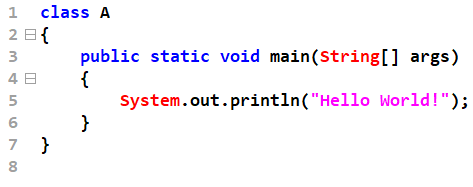
Here, in this program, the code is as follows,
class Hello World
{
	public static void main(String[] args)
	{
		System.out.println("Hello World!");
	}
}
The HelloWorld is the class
Next is the main method, which, in Java, represents the starting point for the program execution.
(For a detailed description of the main method, visit the page “The Purpose of the Main Method in Java.”)
Lastly, the System.out.println command line allows the programmer to see the output of the program on the console.
Thirdly, it is important to save the file. In the first step, the developer assigns the file name. So, save it using the same file name. Importantly, cross-check whether the file name is similar to the class name. Otherwise, there will be errors while running the program.
Fourthly, Compile the program, in terminal
Example: “javac program.java”
Compiling the program is another important step. By using the command ‘javac,’ the program can be compiled. While including this command, also use the suffix file name ‘javac HelloWorld.java.’
After compiling, it generates a class file called ‘HelloWorld.class’. However, the successful generation of a class file happens only if the file does not have any syntax errors.
Running the Program:
After compiling the program, the programmer can run the program using the command, ‘java’.
The complete command looks like, ‘java HelloWorld’
The output of the program is Hello, World!
Importance of Learning Java Hello World Program
Though the Hello World program in Java seems to be very simple and has fewer complexities, it plays a very important role in the learner’s ability to understand the foundational steps of programming in general in the Java environment. Writing a Java Hello World program enlightens the learner’s understanding in the following ways.
Understand the Development Environment
Tool Setting
Before running a Java code, it is essential to arrange the Java Development Environment, which includes installing the JDK, configuring the JVM, and ensuring the proper working of the IDE.
If the program compiles and runs successfully, then the learner can get assurance and try to code other complex programming concepts with confidence.
Understand the Foundation Concept of Java Programming
The learner gets familiarized with Java programming concepts, even with a simple program like the Hello World Program. Typically, Java syntax includes a class, a main method, and an output statement.
Running Java Program: The Essentials of Compilation and Execution
Running a C program involves only one step. In contrast. there are two steps to follow while running the Java program. The first step includes the compilation, which consists of the use of javac and Java to execute the code in the second step.
Compilation
It enables the source code or human-readable format to convert into binary format, which the JVM can understand by using javac.
Execution
By using Java, the binary form is converted into a machine-reading format that is easy for a computer to understand.
Thus, by writing a simple Java program, learners can get a basic knowledge and overall understanding of the essential steps.
Get to Know the Java Syntax Essentials: Java follows specific pre-defined rules. They include the following,
Case Sensitivity:
Java shows case sensitivity. For example, For Java ‘hello world’ (which is in small letters)
and ‘HelloWorld’ (in Capitals) are not the same.
Contains Various Keywords: Java uses keywords such as Public and Static. While the public keyword enables the class and method to access from anywhere (like within the package or outside the package), the static keyword ensures the execution of the main method without the creation of an instance of the class. Here, an object created from a class is known as an instance of a class.)
Java code structure: Each programming language follows a specific code structure. In Java, curly brackets enclose the code. So, it is important for the learner to understand the correct place of enclosing the code.
Gain Insights about Common Troubleshooting Areas
Writing a simple program helps analyze each individual needs. Like where a learner is making mistakes while writing the code. Some of the common errors include runtime errors, compilation errors, and syntax errors.
Familiarize with Programming Basics
Starting to code with a basic programming language enables learners to solve more complex problems with ease.
With Java programming language exhibiting exception features such as versatility and robustness, it is finding use across numerous applications. Hence, it is of greater importance for a programmer intending to start a career in the IT industry to know the essentials of writing code to grasp the basics of programming language.