
Application software is a program designed to carry out specific user-defined digital tasks for personal or professional use. While application software enables users to simplify personal and educational to business activities, the OS is responsible for managing the underlying hardware. Moreover, the operating system serves as a platform for other software programs, such as application software, to run successfully by connecting them to the hardware and managing them. Common examples of application software include media players, presentation software, spreadsheet applications, web browsers, graphic design applications, and word processors.
Computer System Hierarchy
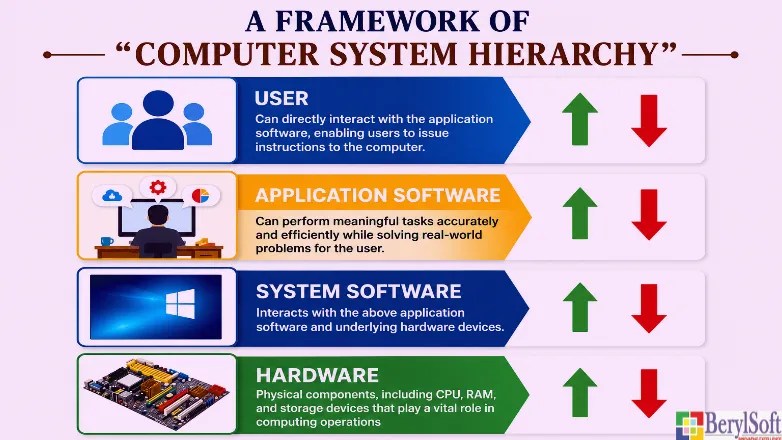
Understanding a computer system hierarchy enables one to correlate the importance of various components of a computer with its functionalities. It involves various steps, starting from the basic hardware unit to the sophisticated software. Importantly, all components provide an overview of the complete computing environment, including users, application software, system software, and hardware.
- Users: Programmers or end-users who interact with the computer system to complete specific tasks by giving necessary instructions.
- Application Software: This is software that helps users perform digital tasks, such as browsing the web, filling out online forms, and entering data. For example, Microsoft Word enables users to enter data by using the keyboard or mouse. Likewise, web browsers are used for browsing the internet.
- System Software: It is important software that enables the interconnection between application software and the underlying hardware architecture for processing user inputs.
- Hardware: These are the physical computer components, such as I/O devices, the CPU, and RAM, that enable data processing.
What is Application Software?
Through application software, a user can give instructions to the computer to work in a particular manner. In addition, users can directly interact with the application, which enables them to perform certain specific functions. For example, to prepare a written document, users can use Microsoft word, an application.
Application is a group of programs. To create an application, developers write code using high-level development tools. Although popular languages include Java and .NET, there are also broader opportunities associated with low-level programming languages, such as C, as they ensure efficiency and swift project development. For further information, check the topic “applications of C programming language“.
What is a program? It is the collection/group of statements in the form of a function. Also, it can be termed a logical block that defines a group of instructions to perform tasks.
A group of programs constitutes an application. It is an independent, executable, outbound (meaning it takes time at the output device to compute) language-specific group of an instruction set. In simple terms, it is a group of programs.

Main Types and Categories
There are three categories of application software: general-purpose, special-purpose, and customized. While general-purpose software, such as web browsers and Microsoft Word, helps with simple, everyday tasks, specialized software focuses on specific tasks, such as billing systems and payroll software. In contrast, customized software serves individual or organizational needs. Hospital Management systems and Banking Software are a few such examples in the customized application category.
Real-World Examples
Some standard software we use in our day-to-day activities is the best example of application software.
Some popular communication apps like
- Communication Tools: Microsoft Teams, WhatsApp, Zoom
- Media Players: VLC Media Player, Windows Media Player
- Graphics Software: Adobe Photoshop, Microsoft Paint, Canva
- Web Browsers: Google Chrome, Mozilla Firefox, Brave
- Word Processors: Microsoft Word, Google Docs
Key Functions and Benefits
Application software helps carry on personal or business activities. There are various applications present in the market. However, users must select and install the application that suits their individual or business needs. Like music apps, communication apps, etc.,
The purpose of designing application software is to enable users to perform tasks on a computer to solve critical problems efficiently. It connects the user and the system software, enabling users to complete tasks.
Some key functions include the following:
- Create and Edit Content
- Users can seamlessly create and modify a wide range of content types, including text, statistical data, audio, images, presentations, videos, and graphics.
- Process Data
- Another feature of this software is that it can assist users in performing complex data analysis while analyzing enormous amounts of data in a fraction of the time. Spreadsheets are one example that enable mathematical calculations and present the data in graphs for easy viewing.
- Web Browsing
- With the inclusion of web browsers, application software enables users to access the internet and visit various websites, allowing them to avail online services with a click of a mouse, widening access to a wide range of capabilities, such as filling online applications and other services.
- Automation
- With the ability to automate, many users find application software helpful in resolving complex tasks by automating specific steps.
Benefits include the following
There are various associated benefits in using this software,
- Enhanced Productivity
- Helps users complete tasks in less time by enabling them to think faster while remaining accurate and efficient.
- Streamline Complex Tasks
- With specialized tools and user-friendly interfaces, users can solve complex tasks without hassle.
- Enhance Decision-Making Skills
- With Spreadsheets, for example, analyzing data and generating reports are not as tedious as with conventional methods.
- Communication
- With the availability of email, messaging, and video conferencing apps through the application software, communicating with people across the globe is made possible
System Software vs. Application Software
| Features | System Software | Application Software |
| Real-Time Example | They include Linux, Android, Windows 11, and macOS | User interfaces like WhatsApp, Microsoft Word, and Google Chrome |
| Primary Function | It is the primary software that operates and manages the computer hardware | Ensures the end-user can perform tasks |
| Dependency | It is the primary software and can therefore run independently. As a result, it does not require support from other software, such as application software. | It runs on an operating system. Hence, it depends on the OS to function. |
| User Engagement | Although it plays a prominent role in how the computer hardware works, it is invisible to the user. | Users can interact directly with the application software through an interface. |