
The main method in Java, the entry point for program execution, follows a predefined format: public static void main(String[] args). The JVM, while launching the program, searches for this formatted code and starts executing it. If the JVM cannot identify this format, it will not launch the application.
All applications, ranging from even the simple “Hello World” program to robust applications adaptable across large enterprise solutions, use the main() method to execute the program successfully.
How to Declare the Main Method in Java? Syntax with Examples
Declaring the main method in Java with the correct syntax is essential, as it describes the correct access point for the Java Virtual Machine. The main method in Java must always be declared inside the class wrapper only.
public class MainMethodSample { public static void main(String[] args) { // The JVM searches for this point to start executing the program System.out.println("A predefined layout of Java Main Method "); }}
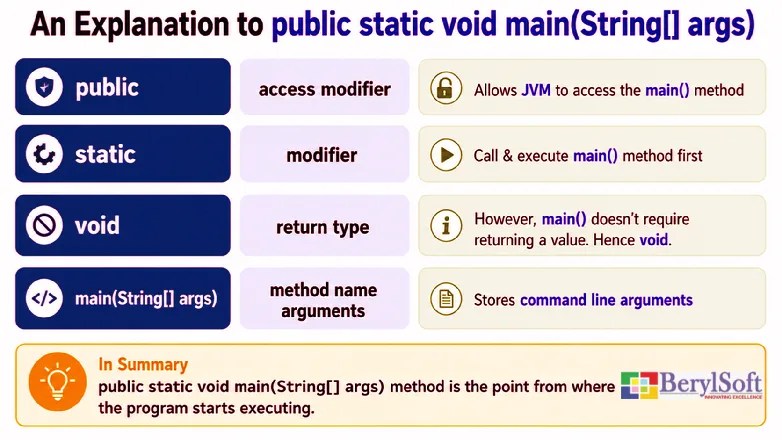
Syntax Breakdown of the Java Main Method
Public
It is an access modifier. By including public in main(), the method is accessible from any package or class. Thus, it allows the JVM to access it even from outside the class.
Static
It is a keyword in Java that specifies that a method belongs to the class itself rather than to an instance of the class. Thus, by declaring main() as static, the JVM can call the method directly without requiring an object of the class to be instantiated.
Void
It is a return type in Java. void is declared in the ‘main’ method, as the JVM does not require a return value from this method. As a result, it enables the main() method to simplify program initialization.
main() Method
It is the predefined method identifier. Specifically, after launching an application, the JVM first searches for this method signature to execute the Java program.
String[] args
It denotes command-line arguments and enables programmers to pass them to the Java application. These arguments are arrays of String objects that allow programmers to supply runtime input parameters without altering the source code.
Understanding Java Classes and the Entry Point
Java is based on object-oriented programming, which employs classes as blueprints for creating objects.
Here, a class serves as a template, layout, blueprint, or prototype through which programmers construct an object. It is a user-defined data type that includes data members and member functions.
For example, float empBasic; is the data member.
void calculateTotalPay() is the corresponding member function.
Importance of Classes in Java
Classes are very important for developing programming applications, especially enterprise-level solutions, as they help bring together data and its relevant operations, which otherwise may be scattered across the program. As such, classes in Java ensure code is organized into logical units and not only promote code reusability but also improve maintainability and readability. It also supports core principles such as polymorphism and inheritance in object-oriented programming.
What is the Format to Write a Class?
The first letter should be in capital letters whenever we write the class name. It is a universal standard.
Example includes: public class Employee
Here, the class name, Employee, starts with a capital letter.
What does a Class in Java Contain?
- Data Members (Fields)
- Member Functions (Methods)
- Constructors
main()Method
How Many Classes Should Include the Main Method in Java in a Program
In a Java program, if there are a total of four classes with names A, B, C, and D, it is optional to include the main() method in every class, but at least one class must include it. In the example program below, Class D contains the main() method. Although the remaining classes do not include the main() method, Class D takes the responsibility of creating objects for those classes, like Class A, Class B, and Class C.
class A { public void am() { System.out.println("am() in Class A"); }}class B { public void bm() { System.out.println("bm() in Class B"); }}class C { public void cm() { System.out.println("cm() in Class C"); }}public class D { public void dm() { System.out.println("dm() in Class D"); } public static void main(String[] args) { A a = new A(); a.am(); B b = new B(); b.bm(); C c = new C(); c.cm(); D d = new D(); d.dm(); }}
Output
am() in Class A
bm() in Class B
cm() in Class C
dm() in Class D
The Entry Point in Java
The main() method is the starting point of program execution. Because there is a standardized point to begin executing an application, there are various associated benefits. Consequently, Java exhibits predictability, portability, and consistency across multiple environments. As such, it is very important to understand the complete syntax associated with this entry point or the main() method.
Deep Dive: The String[] args Parameter Importance
Because of the String[] args Parameter, Java can receive input values early, even at the start. Also, programmers can execute the same program using different input values, even without modifying the source code. Thus, it increases programming capabilities like adaptability and reusability. For instance, if there is a calculator program, programmers can calculate using an extensive range of numbers by giving them in command-line arguments. This can be done without making any changes to the source code.
Lessons for Hardcoded Values
In case there are no command-line arguments, programmers have to embed values into the code. That would make it difficult to add new values, as it requires code modification, making the program less robust and less flexible. However, including command-line arguments enables programmers to supply values externally.
Promotes Batch Processing, Automation, and Improves Reusability
Several Java applications execute programs using scripts with step-by-step scheduled tasks. Using command-line arguments, programmers can enable features that ensure code execution by automatically receiving various parameters. For example, it can generate scheduled reports, process different input files, and execute automated test cases. Thus, the command-line arguments in the Java main() method allow the program to adapt to different situations using varied inputs.